Imagine a contact form with a strong automated accessibility score. Every input has a label, and the colours pass the checks the tool performs. Yet the date picker cannot be operated with a keyboard, or an error message leaves someone unsure how to continue. The report looks reassuring; the task is still blocked.
This is an illustrative situation, not a finding about Verunel or a particular customer. It captures the central distinction: an automated result describes the checks performed, not every person’s ability to use the site.
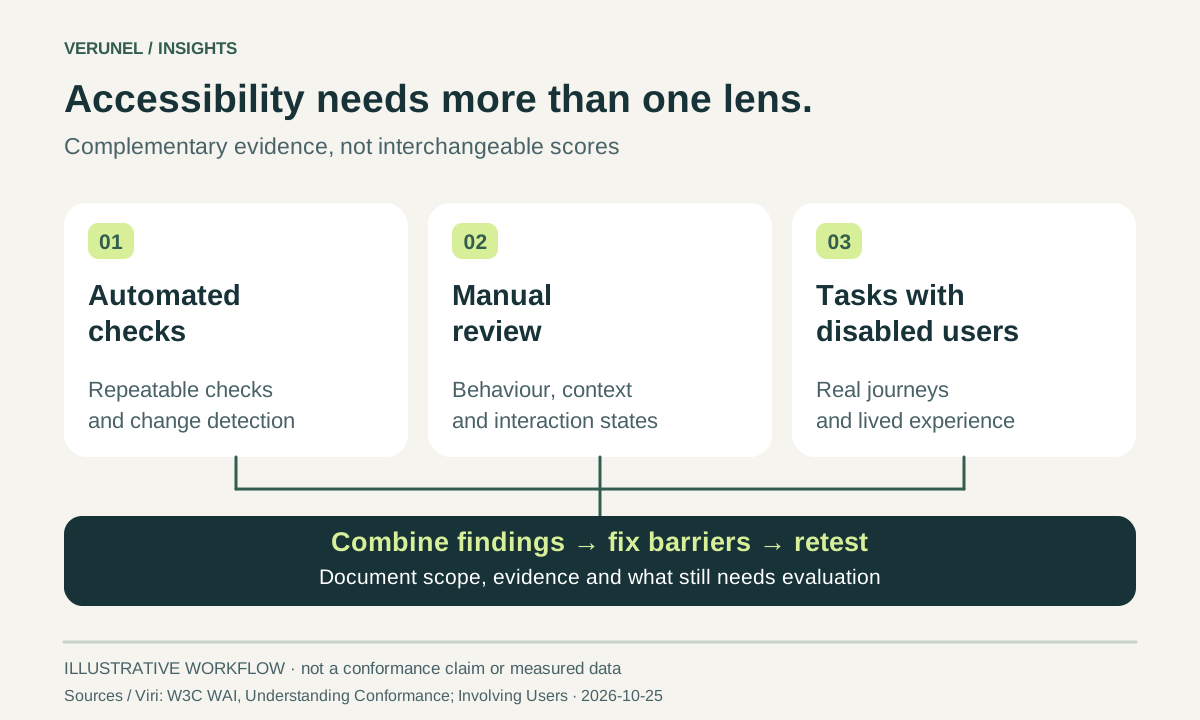
W3C’s guidance on evaluating WCAG conformance calls for both automated testing and human evaluation. It also recommends usability testing involving people with disabilities. A tool score alone is not a declaration that all applicable requirements have been met. W3C: understanding conformance
Build three complementary layers of evidence
Use automation to locate repeatable issues and help monitor changes. Add manual checks to examine behaviour and context. Then involve disabled users in realistic tasks to understand barriers that a checklist may not explain. W3C advises combining user involvement with standards-based evaluation rather than treating either as a substitute for the other. W3C WAI: involving users
The practical benefit is better evidence. Instead of “accessibility needs work”, a developer receives the affected screen, the action attempted, the result, and the intended behaviour. A business owner can see which customer task needs attention.
Follow the keyboard through an entire journey
Try the main navigation, a product or service choice, a form, and its confirmation. Can you reach and operate the controls without a mouse? WCAG’s keyboard criterion addresses operating functionality through a keyboard interface, with a limited exception for functions that inherently depend on the path of a movement. W3C: keyboard
Do not stop when the first button works. Test opened menus, dialogs, and validation states. Record the sequence rather than only the final screenshot; another person should be able to reproduce the difficulty.
Also inspect sticky headers and banners. WCAG 2.2’s Focus Not Obscured (Minimum) criterion requires a component receiving keyboard focus not to be entirely hidden by author-created content. “Not entirely hidden” is the criterion’s minimum, not an instruction to make controls only barely visible. W3C: focus not obscured
Check meaning, not just the presence of text
An image can have alternative text and still be poorly explained. The appropriate alternative depends on its purpose: conveying information, performing a function, or providing decoration. W3C’s decision tree distinguishes these cases. W3C WAI: alternative-text decision tree
Ask what a visitor would miss without the image. For a chart, make the essential message and relevant values available in surrounding text or an appropriate text alternative. For a decorative flourish, avoid adding distracting narration merely to satisfy a field in a content-management system.
Forms deserve the same attention. Tell people what went wrong and how to correct it, rather than relying on a red outline alone. W3C’s forms guidance describes clear feedback, error identification, and instructions that support recovery. W3C WAI: user notifications
Treat mobile controls as interaction design
Small, crowded controls can be difficult to activate. WCAG 2.2’s Target Size (Minimum) criterion uses 24 by 24 CSS pixels, with specified exceptions, including sufficient spacing. It is not a blanket instruction that every visible icon must have those dimensions. Evaluate the interactive target and the criterion’s conditions. W3C: target size
For a practical review, examine close and delete controls, pagination, filter chips, and links beside other links. Test the actual journey rather than assuming the desktop layout tells the whole story.
Write findings that survive a handover
Give each issue an owner, an affected component, reproduction steps, and a clear acceptance check. For example: “Complete the enquiry flow using the keyboard, including opening and closing the date picker, correcting an error, and reaching confirmation.” Label that as a proposed test, not a claim that the current site has failed it.
Be explicit about coverage. A review of selected pages is not the same as a complete conformance evaluation. W3C’s introductory Easy Checks resource itself warns that a page may appear to pass those checks while still having significant barriers. W3C WAI: Easy Checks
Make the audit a starting point
Verunel’s full website audit is €39 excluding VAT, paid once: one domain, up to 10 URLs, an AI summary, a PDF and share link, and executive and developer reports. Use the findings to plan remediation and identify where specialist manual evaluation is needed. The audit is not an accessibility certification or a guarantee of legal compliance.
Audit coverage: deeper browser checks apply to the entry page; additional URLs receive technical HTTP and content review.
Sources and review date
Official sources checked on 25 October 2026: